Zhiyun Crane 3S Compatibility List: 85 Cameras
The Zhiyun Crane 3S is Zhiyun’s heavy-duty gimbal for cinema cameras and big DSLR rigs, with a payload of up to 6.5 kg. It’s discontinued. The final list (V4.40, 13 October 2023) covers 85 cameras, all controlled by cable.
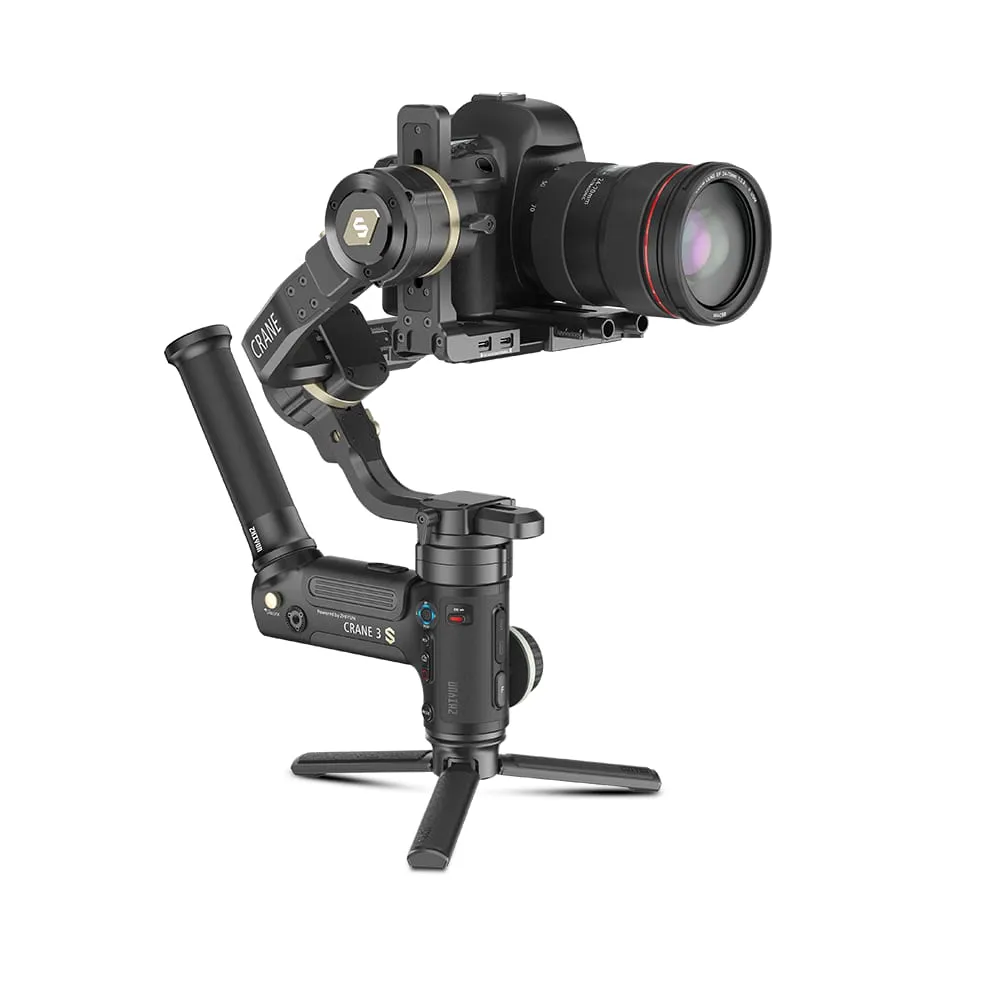
Crane 3S specs
| Zhiyun Crane 3S | |
|---|---|
| Weight | About 2470 g (without extension arm) |
| Payload | 600 g – 6.5 kg |
| Battery | 3 × 18650 (2600 mAh), removable, up to 12 h. DC-IN for the TransMount PowerPlus pack |
| Charging | About 4 h in the external charger |
| Camera control | Cable (Type-C to Micro USB, Mini USB, Type-C and Multi in the box). Optional 2.5 mm cable for cinema cameras |
| Tilt and pan | 360° unlimited on both |
| Versions | Crane 3S (SmartSling handle) and Crane 3S-E (EasySling handle) |
| Status | Discontinued: no more firmware updates or new cameras |
Full Crane 3S camera compatibility list
Sony
| Camera | Cable | Photo | Video | Zoom | Half-press AF | Focus wheel | Shutter / aperture / ISO |
|---|---|---|---|---|---|---|---|
| Sony α9 | Type-C to Micro | ✓ | ✓ | ✗ | ✓ | ✓ | ✓ |
| Type-C to Multi | ✓ | ✓ | ✓ | ✗ | ✗ | ✗ | |
| Sony α9 II | Type-C to Type-C | ✓ | ✓ | ✗ | ✓ | ✓ | ✓ |
| Type-C to Multi | ✓ | ✓ | ✓ | ✗ | ✗ | ✗ | |
| Sony α7R5 | Type-C to Multi | ✓ | ✓ | ✓ | ✗ | ✗ | ✗ |
| Type-C to Type-C or Type-C to Micro | ✓ | ✗ | ✗ | ✓ | ✓ | ✓ | |
| Sony α7R4 | Type-C to Type-C | ✓ | ✓ | ✗ | ✓ | ✓ | ✓ |
| Type-C to Multi | ✓ | ✓ | ✓ | ✗ | ✗ | ✗ | |
| Sony α7R3 | Type-C to Multi | ✓ | ✓ | ✓ | ✗ | ✗ | ✗ |
| Sony α7M3 | Type-C to Multi | ✓ | ✓ | ✓ | ✗ | ✗ | ✗ |
| Sony α7S3 | Type-C to Multi | ✓ | ✓ | ✓ | ✗ | ✗ | ✗ |
| Sony α7R2 | Type-C to Multi | ✓ | ✓ | ✓ | ✗ | ✗ | ✗ |
| Sony α7S2 | Type-C to Multi | ✓ | ✓ | ✓ | ✗ | ✗ | ✗ |
| Sony α6600 | Type-C to Multi | ✓ | ✓ | ✓ | ✗ | ✗ | ✗ |
| Sony α6500 | Type-C to Multi | ✓ | ✓ | ✓ | ✗ | ✗ | ✗ |
| Sony α6400 | Type-C to Multi | ✓ | ✓ | ✓ | ✗ | ✗ | ✗ |
| Sony α6300 | Type-C to Multi | ✓ | ✓ | ✓ | ✗ | ✗ | ✗ |
| Sony α6100 | Type-C to Multi | ✓ | ✓ | ✓ | ✗ | ✗ | ✗ |
| Sony α7S3 | Type-C to Micro or Type-C to Type-C | ✓ | ✓ | ✗ | ✓ | ✓ | ✓ |
| Sony A7C | Type-C to Type-C | ✓ | ✓ | ✗ | ✓ | ✓ | ✓ |
| Sony A1 | Type-C to Type-C or Type-C to Micro | ✓ | ✓ | ✗ | ✓ | ✓ | ✓ |
| Type-C to Multi | ✓ | ✓ | ✓ | ✗ | ✗ | ✗ | |
| Sony ILME-FX3 | Type-C to Multi | ✓ | ✓ | ✓ | ✗ | ✗ | ✗ |
| Type-C to Micro | ✓ | ✓ | ✗ | ✓ | ✓ | ✓ | |
| Sony FX30 | Type-C to Type-C | ✓ | ✗ | ✗ | ✓ | ✓ | ✓ |
| Type-C to Multi | ✓ | ✓ | ✗ | ✗ | ✗ | ✗ | |
| Sony α7M4 | Type-C to Multi | ✓ | ✓ | ✓ | ✗ | ✗ | ✗ |
| Type-C to Type-C or Type-C to Micro | ✓ | ✗ | ✗ | ✓ | ✓ | ✓ | |
| Sony ZV-E1 | Type-C to Type-C | ✓ | ✗ | ✗ | ✓ | ✓ | ✓ |
| Sony FS5 | Type-C to φ2.5mm Plug (optional) | ✗ | ✓ | ✗ | ✗ | ✗ | ✗ |
| Sony FS7M2 | Type-C to φ2.5mm Plug (optional) | ✗ | ✓ | ✗ | ✗ | ✗ | ✗ |
| Sony FX9 | Type-C to φ2.5mm Plug (optional) | ✗ | ✓ | ✗ | ✗ | ✗ | ✗ |
| Sony Z280 | Type-C to φ2.5mm Plug (optional) | ✗ | ✓ | ✗ | ✗ | ✗ | ✗ |
Panasonic
| Camera | Cable | Photo | Video | Zoom | Half-press AF | Focus wheel | Shutter / aperture / ISO |
|---|---|---|---|---|---|---|---|
| Panasonic G9 | Type-C to Micro | ✓ | ✓ | ✗ | ✓ | ✓ | ✓ |
| Panasonic GH5 | Type-C to Type-C | ✓ | ✓ | ✗ | ✓ | ✓ | ✓ |
| Panasonic GH5S | Type-C to Type-C | ✓ | ✓ | ✗ | ✓ | ✓ | ✓ |
| Panasonic S1 | Type-C to Type-C | ✓ | ✓ | ✗ | ✗ | ✓ | ✓ |
| Panasonic S5 | Type-C to Type-C | ✓ | ✓ | ✗ | ✓ | ✓ | Shutter + ISO |
| Panasonic S5Ⅱ | Type-C to Type-C | ✓ | ✓ | ✗ | ✓ | ✓ | Shutter + ISO |
| Panasonic GH6 | Type-C to Type-C | ✓ | ✓ | ✗ | ✓ | ✓ | ✓ |
| Panasonic S1H | Type-C to Type-C | ✓ | ✓ | ✗ | ✗ | ✓ | ✓ |
| Panasonic DC-BGH1 | Type-C to Type-C | ✗ | ✓ | ✗ | ✗ | ✓ | ✓ (video mode) |
Canon
| Camera | Cable | Photo | Video | Zoom | Half-press AF | Focus wheel | Shutter / aperture / ISO |
|---|---|---|---|---|---|---|---|
| Canon 1DX2 | Type-C to Micro | ✓ | ✓ | ✗ | ✓ | ✓ | ✓ |
| Canon 1DX3 | Type-C to Type-C | ✓ | ✓ | ✗ | ✓ | ✓ | ✓ |
| Canon 5D3 | Type-C to Mini | ✓ | ✓ | ✗ | ✓ | ✓ | ✓ |
| Canon 5D4 | Type-C to Micro | ✓ | ✓ | ✗ | ✓ | ✓ | ✓ |
| Canon 5DS | Type-C to Micro | ✓ | ✓ | ✗ | ✓ | ✓ | ✓ |
| Canon 5DS R | Type-C to Micro | ✓ | ✓ | ✗ | ✓ | ✓ | ✓ |
| Canon 6D | Type-C to Mini | ✓ | ✓ | ✗ | ✓ | ✓ | ✓ |
| Canon 6D2 | Type-C to Mini | ✓ | ✓ | ✗ | ✓ | ✓ | ✓ |
| Canon 80D | Type-C to Mini | ✓ | ✓ | ✗ | ✓ | ✓ | ✓ |
| Canon 90D | Type-C to Micro | ✓ | ✓ | ✗ | ✓ | ✓ | ✓ |
| Canon EOS R5 | Type-C to Type-C | ✓ | ✓ | ✗ | ✗ | ✓ | ✓ |
| Canon EOS R5C | Type-C to Type-C | ✓ | ✓ | ✗ | ✓ | ✓ | ✓ (photo mode) |
| Canon EOS R6 | Type-C to Type-C | ✓ | ✓ | ✗ | ✗ | ✓ | ✓ |
| Canon EOS R7 | Type-C to Type-C | ✓ | ✓ | ✗ | ✓ | ✓ | ✓ |
| Canon EOS R10 | Type-C to Type-C | ✓ | ✓ | ✗ | ✓ | ✓ | ✓ |
| Canon EOS R | Type-C to Type-C | ✓ | ✓ | ✗ | ✗ | ✓ | ✓ |
| Canon EOS RP | Type-C to Type-C | ✓ | ✓ | ✗ | ✗ | ✓ | ✓ |
| Canon EOS C70 | Type-C to Type-C | ✗ | ✓ | ✗ | ✗ | ✓ | ✗ |
| Canon EOS M6 Mark 2 | Type-C to Type-C | ✓ | ✓ | ✗ | ✓ | ✓ | ✓ |
| Canon 800D | Type-C to Mini | ✓ | ✓ | ✗ | ✓ | ✓ | ✓ |
| Canon 850D | Type-C to Micro | ✓ | ✓ | ✗ | ✓ | ✓ | ✓ |
| Canon EOS R6 Mark Ⅱ | Type-C to Type-C | ✓ | ✓ | ✗ | ✓ | ✓ | ✓ |
| Canon EOS R8 | Type-C to Type-C | ✓ | ✓ | ✗ | ✓ | ✓ | ✓ |
| Canon EOS R3 | Type-C to Type-C LN-UCUC-A02 | ✓ | ✓ | ✗ | ✓ | ✓ | ✓ |
| Canon C200 | Type-C to φ2.5mm Plug (optional) | ✗ | ✓ | ✗ | ✗ | ✗ | ✗ |
| Canon C300 | Type-C to φ2.5mm Plug (optional) | ✗ | ✓ | ✗ | ✗ | ✗ | ✗ |
Nikon
| Camera | Cable | Photo | Video | Zoom | Half-press AF | Focus wheel | Shutter / aperture / ISO |
|---|---|---|---|---|---|---|---|
| Nikon D850 | Type-C to Micro | ✓ | ✓ | ✗ | ✓ | ✓ | ✓ |
| Nikon D780 | Type-C to Micro | ✓ | ✓ | ✗ | ✓ | ✓ | ✓ |
| Nikon Z9 | Type-C to Type-C | ✓ | ✓ | ✗ | ✓ | ✓ | ✓ |
| Nikon Z5 | Type-C to Type-C | ✓ | ✓ | ✗ | ✓ | ✓ | ✓ |
| Nikon Z6 | Type-C to Type-C | ✓ | ✓ | ✗ | ✓ | ✓ | ✓ |
| Nikon Z6 II | Type-C to Type-C | ✓ | ✓ | ✗ | ✓ | ✓ | ✓ |
| Nikon Z7 | Type-C to Type-C | ✓ | ✓ | ✗ | ✓ | ✓ | ✓ |
| Nikon Z7 II | Type-C to Type-C | ✓ | ✓ | ✗ | ✓ | ✓ | ✓ |
| Nikon Z50 | Type-C to Micro | ✓ | ✓ | ✗ | ✓ | ✓ | ✓ |
| Nikon Z30 | Type-C to Type-C | ✓ | ✓ | ✗ | ✓ | ✓ | ✓ |
| Nikon Zfc | Type-C to Type-C | ✓ | ✓ | ✗ | ✓ | ✓ | Aperture |
| Nikon Zf | Type-C to Type-C LN-UCUC-A02 | ✓ | ✓ | ✗ | ✓ | ✗ | Aperture |
Olympus
| Camera | Cable | Photo | Video | Zoom | Half-press AF | Focus wheel | Shutter / aperture / ISO |
|---|---|---|---|---|---|---|---|
| OLYMPUS E-M1Ⅱ | Type-C to Type-C | ✓ | ✓ | ✗ | ✓ | ✓ | ✓ |
Fujifilm
| Camera | Cable | Photo | Video | Zoom | Half-press AF | Focus wheel | Shutter / aperture / ISO |
|---|---|---|---|---|---|---|---|
| FUJIFILM X-T3 | Type-C to Type-C | ✓ | ✓ | ✗ | ✓ | ✗ | Shutter + ISO |
| FUJIFILM X-T4 | Type-C to Type-C | ✓ | ✓ | ✗ | ✓ | ✗ | Shutter + ISO |
| FUJIFILM X-T5 | Type-C to Type-C | ✓ | ✓ | ✗ | ✓ | ✗ | Shutter + ISO |
| FUJIFILM X-T30 | Type-C to Type-C | ✗ | ✗ | ✗ | ✗ | ✗ | ✗ |
| FUJIFILM X-H2S | Type-C to Type-C | ✓ | ✓ | ✗ | ✓ | ✗ | Shutter + ISO |
| Fujifilm X-S20 | Type-C to Type-C | ✓ | ✓ | ✗ | ✓ | ✗ | Shutter + ISO |
Sigma
| Camera | Cable | Photo | Video | Zoom | Half-press AF | Focus wheel | Shutter / aperture / ISO |
|---|---|---|---|---|---|---|---|
| Sigma fp | Type-C to Type-C | ✓ | ✓ | ✗ | ✓ | ✗ | ✗ |
Blackmagic Design
| Camera | Cable | Photo | Video | Zoom | Half-press AF | Focus wheel | Shutter / aperture / ISO |
|---|---|---|---|---|---|---|---|
| BMPCC 4K | Type-C to Type-C | ✗ | ✓ | ✗ | ✗ | ✓ | ✓ |
| BMPCC 6K | Type-C to Type-C | ✗ | ✓ | ✗ | ✗ | ✓ | ✓ |
| BMPCC 6K PRO | Type-C to Type-C | ✗ | ✓ | ✗ | ✗ | ✓ | ✓ |
Z CAM
| Camera | Cable | Photo | Video | Zoom | Half-press AF | Focus wheel | Shutter / aperture / ISO |
|---|---|---|---|---|---|---|---|
| ZCAM E2 🄲 | Type-C to Type-C | ✗ | ✓ | ✗ | ✗ | ✗ | Aperture + ISO (video mode) |
| ZCAM E2 | Type-C to Type-C | ✗ | ✓ | ✗ | ✗ | ✗ | Aperture + ISO (video mode) |
| ZCAM E2 F6 | Type-C to Type-C | ✗ | ✓ | ✗ | ✗ | ✗ | Aperture + ISO (video mode) |
The cinema cameras (Canon C200 and C300, Sony FS5, FS7 II, FX9 and Z280) only start and stop recording, through the optional 2.5 mm cable. The Fujifilm X-T30 is on the list with no control functions.
Setup notes from Zhiyun
- Sony: select PC Remote and power on the gimbal before the camera. With the Micro USB or Type-C cable, set MF for the focus wheel. With the Multi cable, turn on digital zoom and shoot JPEG instead. Optical zoom needs a power-zoom lens.
- Canon: the focus wheel needs the lens in AF and live view on. Turn off Movie Servo AF when you focus during recording. Canon DSLRs can’t half-press AF in live view. On the C200 and C300, set the remote connector to RC-V100 (REMOTE A).
- Nikon: set the lens to A (AF) with AF-S or AF-C. Electronic focus doesn’t work while recording.
- Panasonic: set PC (Tether), put the lens in MF for the focus wheel and turn off USB power supply before you connect.
- Fujifilm: set the connection to USB Tether Shooting Auto. In photo mode, settings change only from the gimbal, and RAW isn’t supported.
- Z CAM: set USB to serial and serial to controller.
Related lists
- Zhiyun Crane 2S: the lighter full-size Crane
- DJI RS 4 Pro: a current 4.5 kg gimbal with cinema camera support
Frequently asked questions
Which cameras are compatible with the Zhiyun Crane 3S?
Zhiyun's V4.40 list (October 2023) has 85 cameras: 26 Canon, 24 Sony, 12 Nikon, 9 Panasonic, 6 Fujifilm, 3 Blackmagic Pocket, 3 Z CAM, plus Olympus E-M1 II and Sigma fp.
What is the payload of the Crane 3S?
600 g to 6.5 kg, according to Zhiyun. Loads near the minimum need the camera backing base.
Can the Crane 3S control cinema cameras?
Only record start/stop on the Canon C200 and C300 and Sony FS5, FS7 II, FX9 and Z280, through an optional 2.5 mm cable. On the Canon models, set the remote connector to RC-V100 (REMOTE A).
What is the difference between the Crane 3S and Crane 3S-E?
The gimbal is the same. The Crane 3S comes with the SmartSling handle, the 3S-E with the simpler EasySling handle.